
2025
SelectBlinds
The AI Feature in SelectBlinds
Prototype Link: https://ai.studio/apps/drive/1FGOl9ZbereiTz40HBHpD05k5Dodgi7je
Role: Sr. AI Product UX Designer
TImeline: 2 weeks (Build, user test, iterate and launch)
Users: Homeowners & Renters
Team of one: Solo Product Designer
Core problem
Buying custom blinds online is a high‑stakes decision that most users make with low confidence. Many shoppers struggle to imagine how a specific fabric, color, or light‑filtering option will look in their actual room, leading to decision fatigue, cart abandonment, or overreliance on free samples and support channels which contributes to high abandonment rates.
At the same time, SelectBlinds aims to increase on-site engagement and drive more revenue from its large catalog of customizable window treatments, but the current experience still expects users to “mentally Photoshop” products into their homes, an approach proven to be a core barrier in visual, style-driven categories across retail.
Overview
SelectBlinds is a large online retailer specializing in custom, DIY-friendly window treatments like blinds, shades, shutters, and drapes, offering a vast selection. They provide the free sample, design help and direct-to-door shipping. They are a popular choice for personalized home decor. The idea was born from my past experience of working for SelectBlinds where Customers have hard time picking the right product for their window/room. Currently Selectblinds has 170+ Product styles and 1800+ Colors/options available and they provides free samples to solve this problem but that isn’t enough.
Hypothesis
If we enable users to visualize blinds in their own environment using an AI-powered image generation tool that matches their preferences, users will gain higher confidence in their purchase decisions, leading to improved engagement metrics, reduced time-to-purchase, and an uplift in overall conversion rates for SelectBlinds.
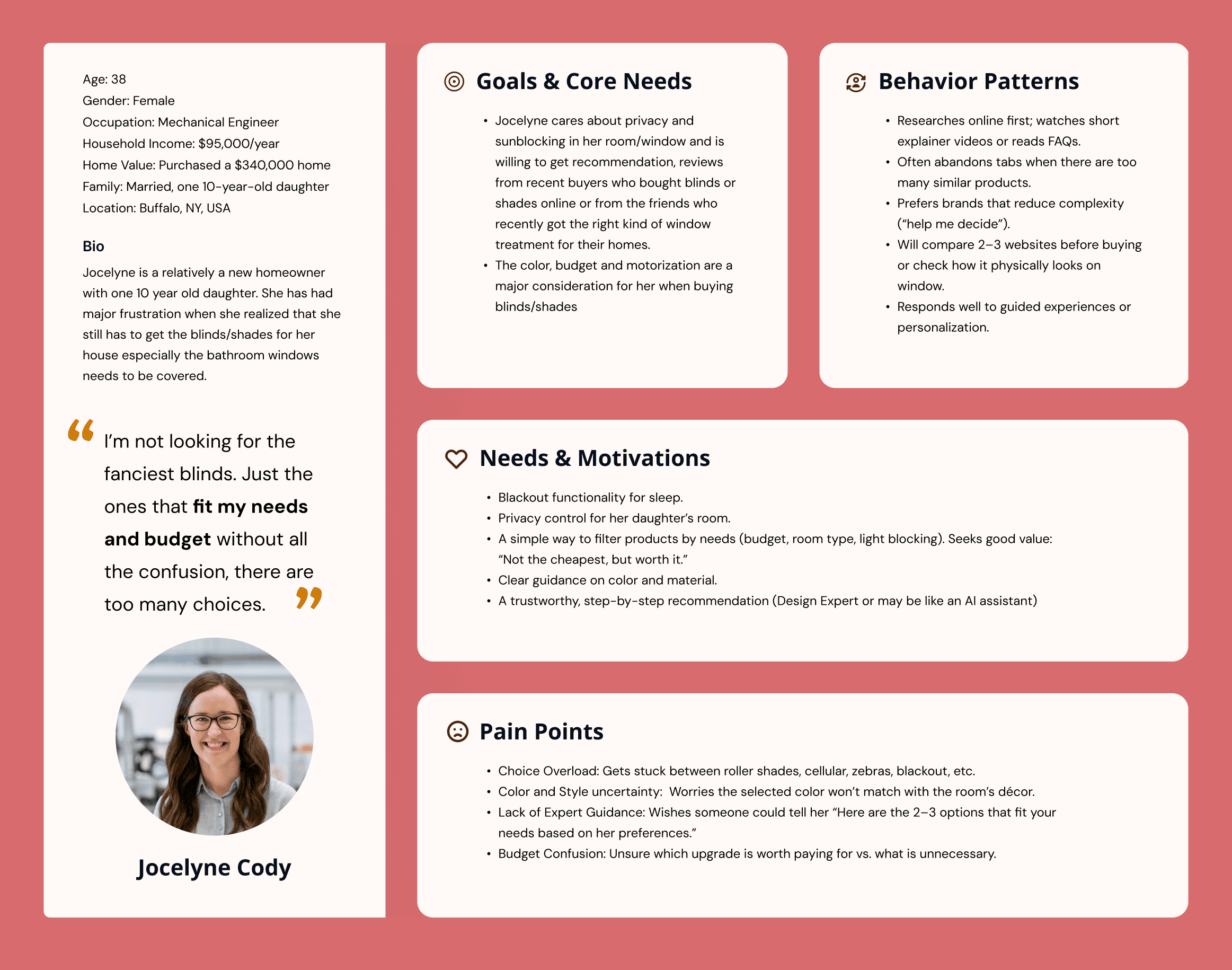
Core Concept
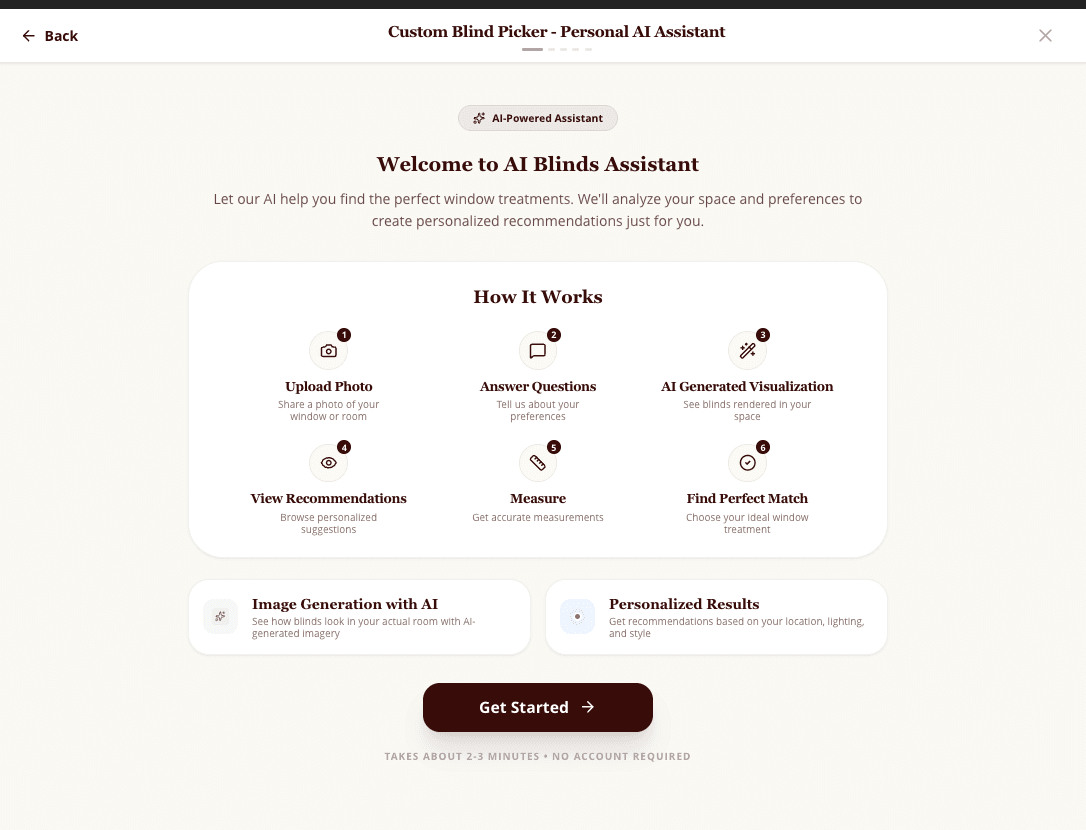
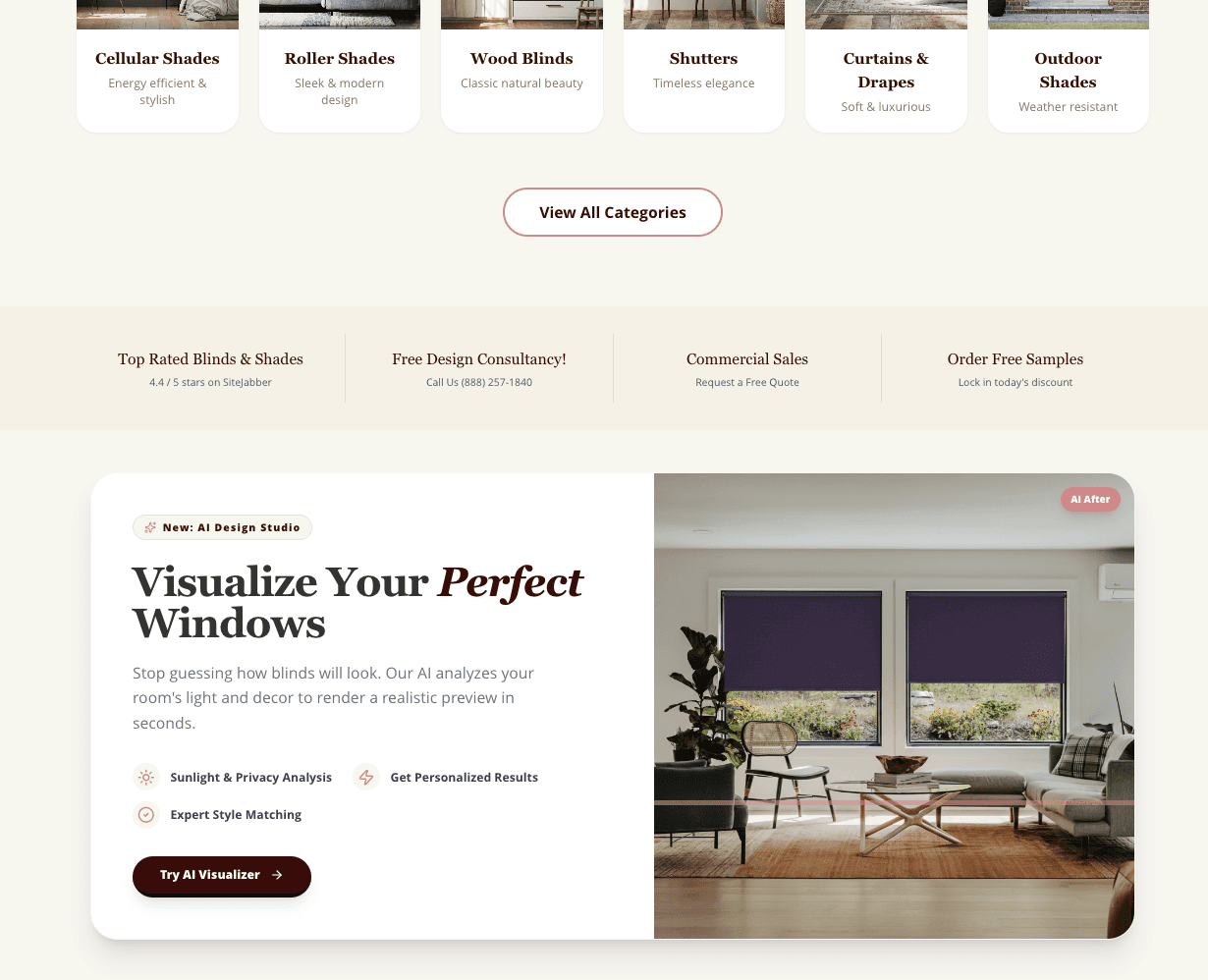
User Explores the Landing page of SelectBlinds.com
The user is overwhelmed with the choices of shades/blinds/shutters available. To make user’s life easy selectblinds will give the recommendation about the best blinds for their house.
'Custom Blind Picker AI' will help the user will help get some ideas and will suggest the choices of blinds/shades/shutters
Based on the recommendations, user can add the suggested products to the cart and “Checkout” or they can “Save for later” and “Share”.
If the user clicks “Save for later” it will add to the cart till the time user is on the website. If the user closes the tab the cart won’t be save
User Contribution
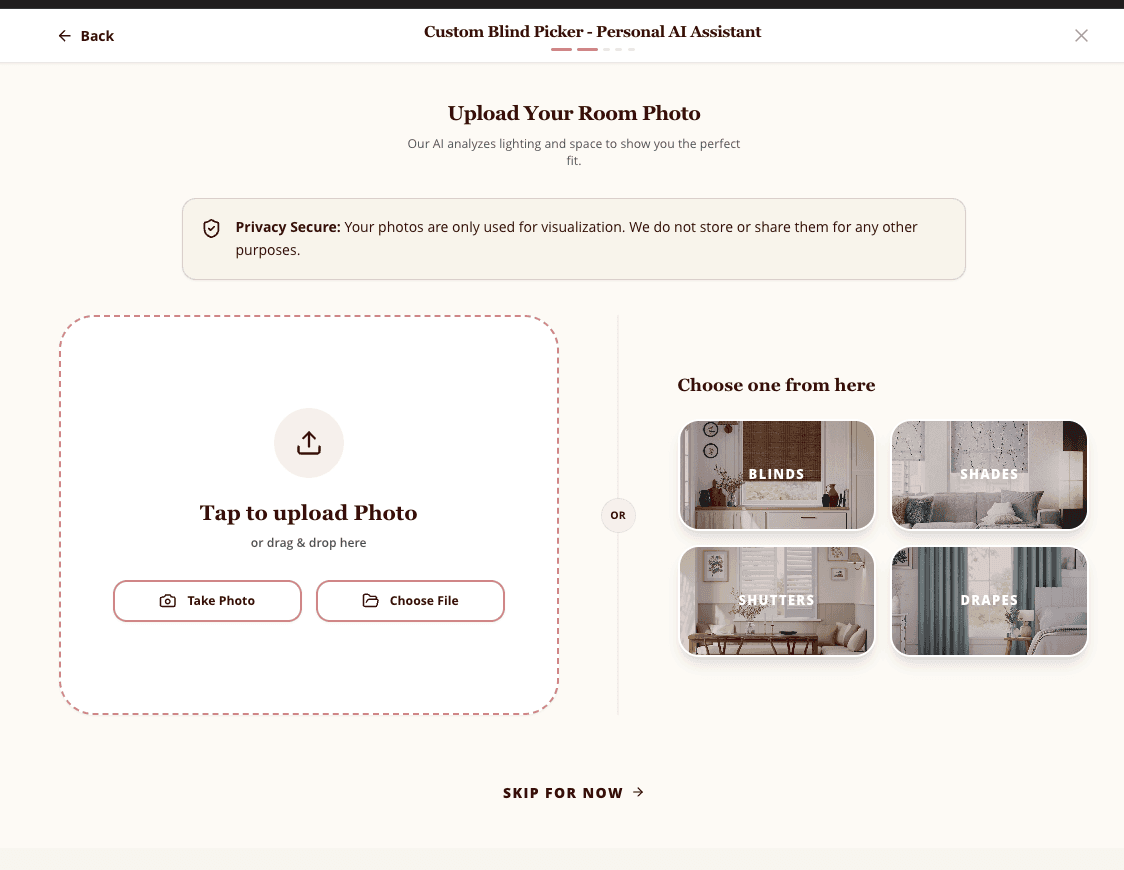
User will upload the pictures of their Windows, Sliders and more to measure the size of the area and share their choices about the the type of Shades or Blinds they need and their budget by answering questions to get recommendations about:
Style & Aesthetic
Favorite colors or tones you want to match
Share something that inspires you (optional for user)
Price range
Choice of Material
Pets or kids safety
Manual or motorized blinds
AI Contribution (High Level)
AI will detect real-time measurement from the photos uploaded by the user:
Computer Vision Window Detection
Room Analysis
Generative Visualization
Pricing Mode
AI Role (What AI does in the background in detail breakdown)
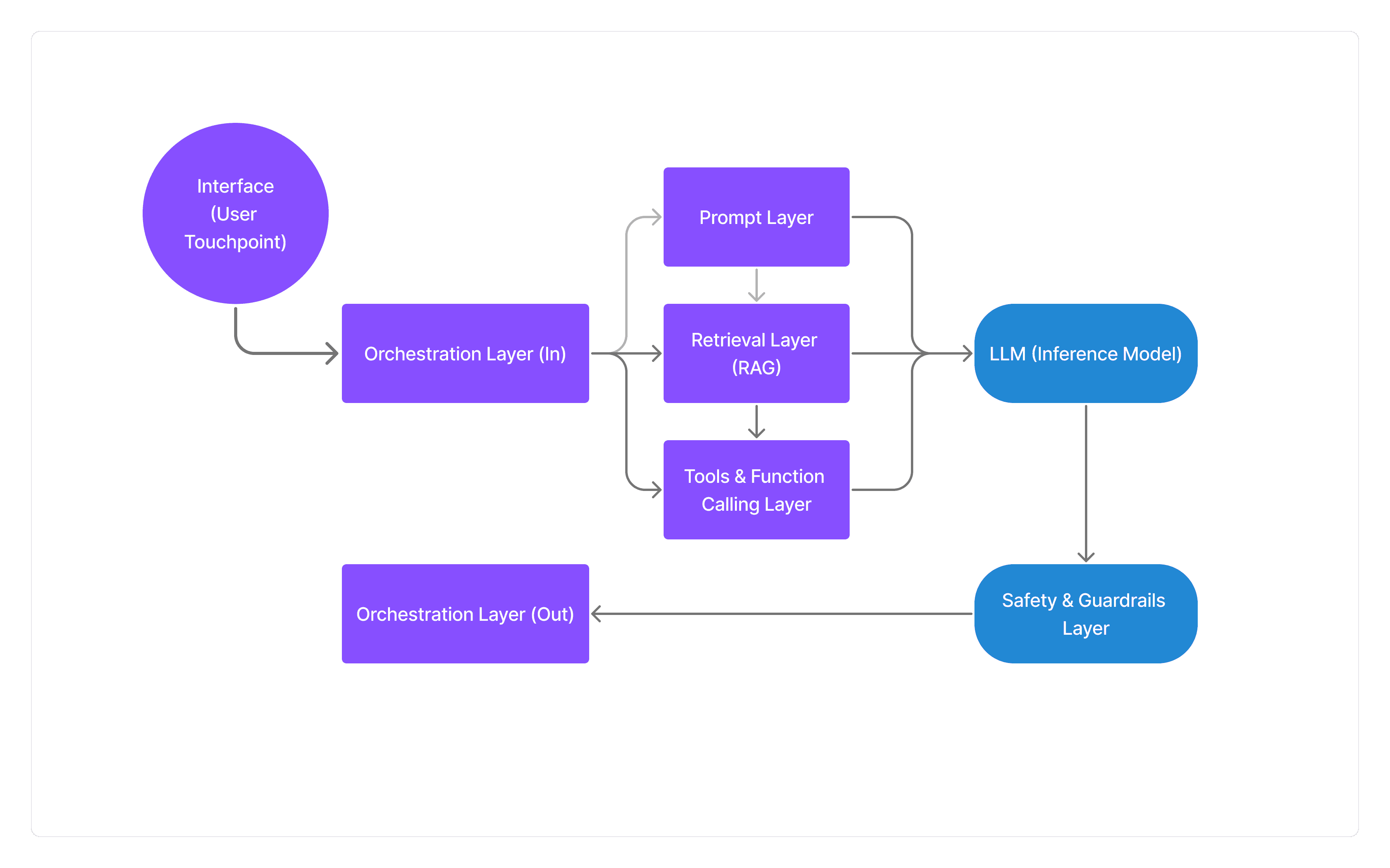
The core intelligence resides in the LLM Inference Model, which reasons over retrieved data to generate personalized product recommendations, trade-off comparisons, and human-readable explanations of its logic—while explicitly avoiding unsafe actions like window measurements or personal inferences—supported by Tools & Function Calling for image analysis, product scoring, and visualization rendering, and fortified by a Safety & Guardrails Layer that enforces disclaimers, blocks unsupported claims, and handles edge cases with clear error messaging or human consultant referrals.
Key challenges like "garbage-in, garbage-out" from inconsistent photo uploads or vague preferences were resolved through rigorous input normalization and session context creation in the Orchestration Layer, while prototype limitations across no-code tools (Google AI Studio and Lovable) were overcome by architecting a custom, production-ready stack that delivers photorealistic room-specific visualizations and 3-4 curated recommendations with confidence scores.
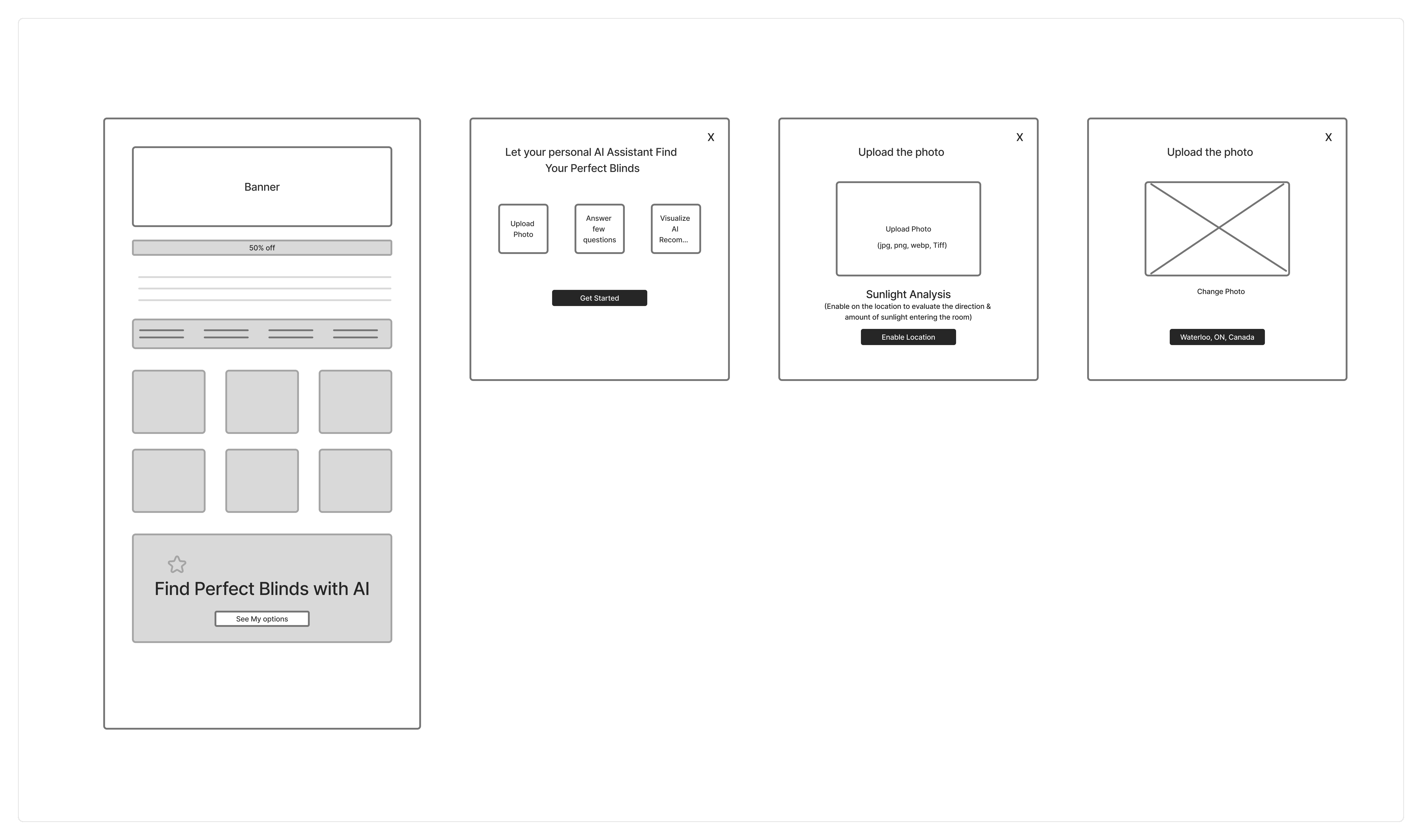
Wireframes
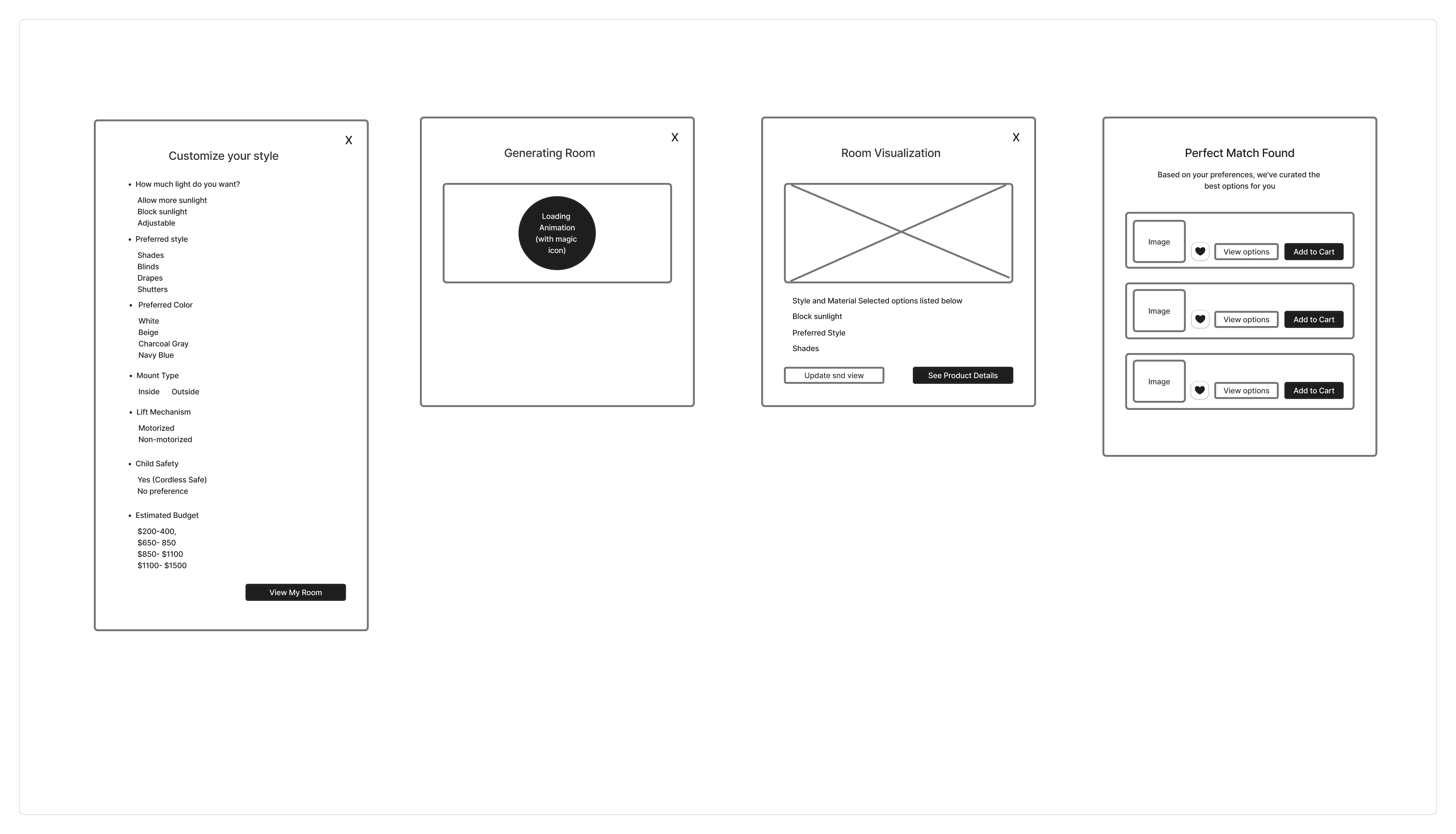
Mockups with prototype
I explored four different no-code AI tools: Claude.ai, Google AI Studio (Build), Lovable, and V0.app.
Claude.ai was able to generate the experience, but the product rendering and overall flow still felt rough and needed more polish
Google AI Studio gave the strongest result. It showed a realistic preview of how the blinds would look on the user’s window and delivered a smooth overall experience, even though it still didn’t fully match my ideal vision.
Lovable also did an amazing job creating the whole experience with a beautiful visual interface and seamless interactions but it ran out of AI balance even on paid plan.
V0.app also followed my instructions well and created a solid experience, but it could not actually show the blinds inside the room image, which was a key requirement for this concept.

User Testing
I ran both live (moderated) and independent (unmoderated) user tests to understand what felt intuitive, confusing, or exciting about the AI blinds visualizer.
Live tests: Users shared their screen while trying the feature, so I could see their real-time reactions and ask questions as they discovered what worked well or got stuck.
Independent tests: I sent users a direct link to test the flow on their own and asked for their honest feedback about what felt smooth versus frustrating.
Goal for user testing:
“According to the user does this navigation flow makes sense?”
“Does the AI respond in a helpful, predictable way?”
“Are you able to view how the Blinds look on your window”?
“Did you feel that you are forced to do any step, or did you feel like quitting in the middle of the flow”?
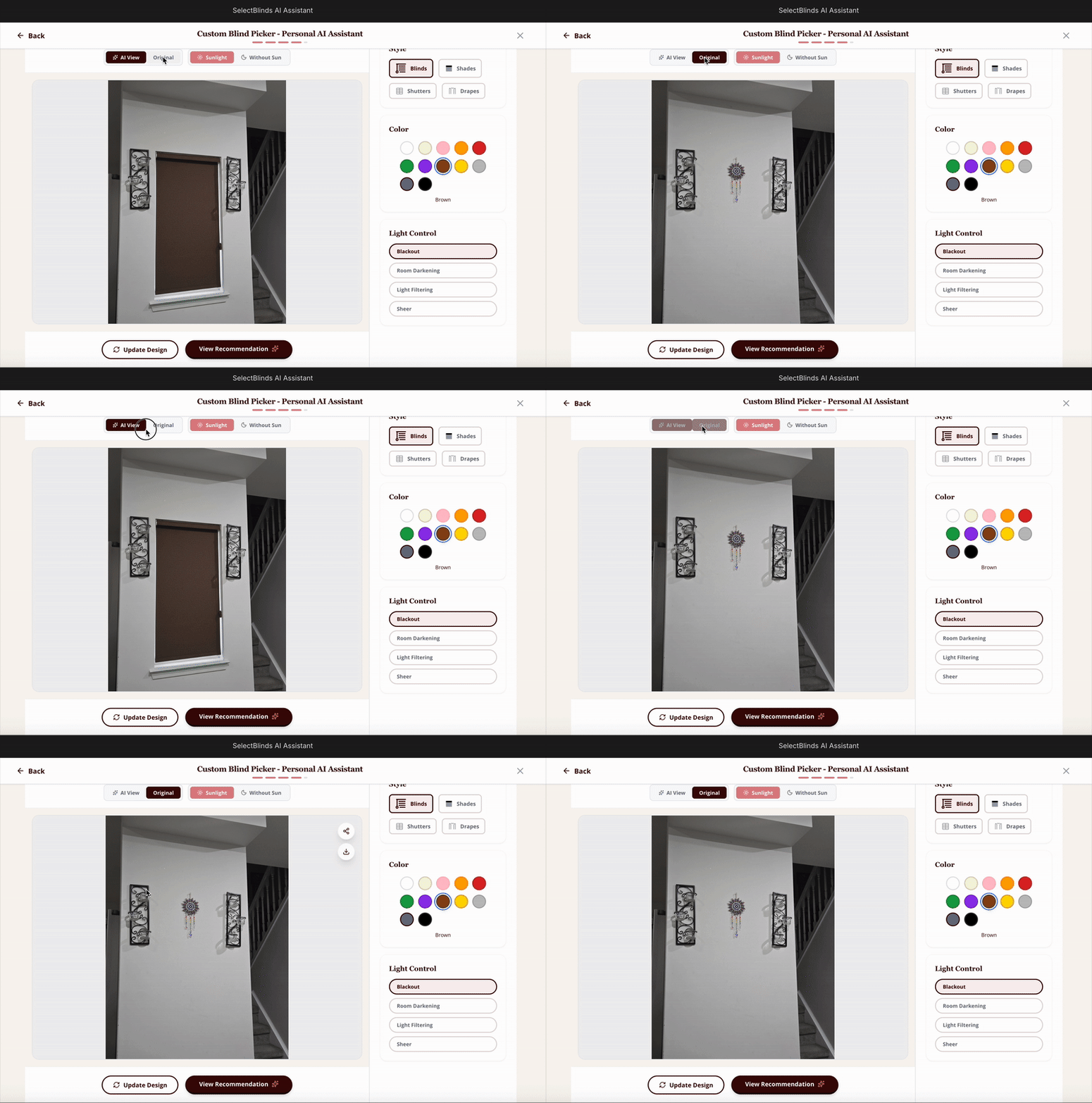
Possible Hallucination Scenario (Edge case):
Users sometimes uploaded room photos without windows (just blank walls), which broke the flow.
Even with a Computer Vision Object Detection model and confidence threshold checking for windows, the system occasionally misread these images and generated inaccurate results.
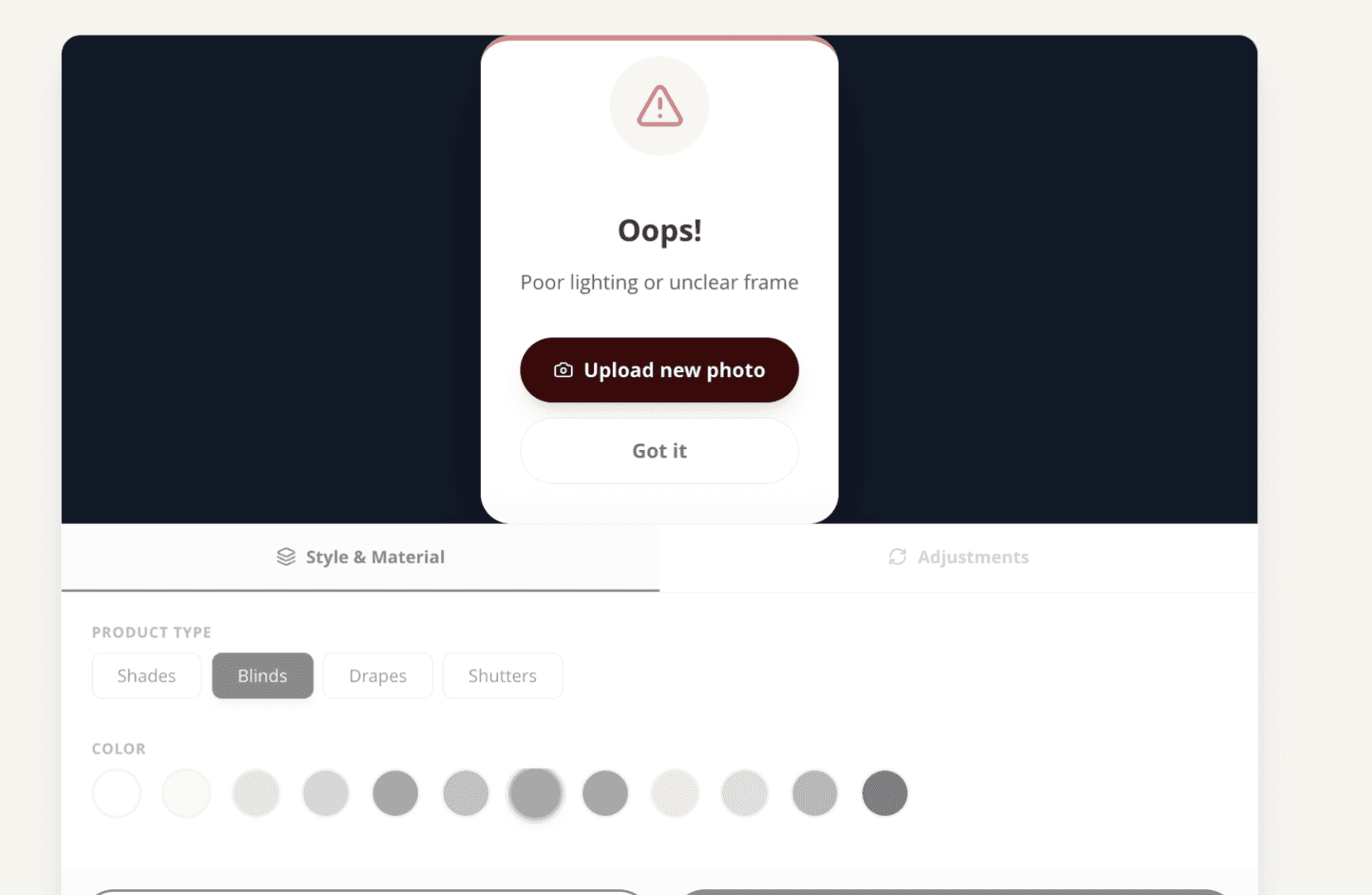
Solution: Added clear validation message to flag windowless images as invalid upfront, preventing bad AI outputs and guiding users to upload better photos.
Validation message:
The system now shows clear validation messages when users upload photos with no windows visible or poor lighting conditions. This prevents bad AI outputs by catching these issues upfront and guides users to upload better photos for accurate blind visualization.
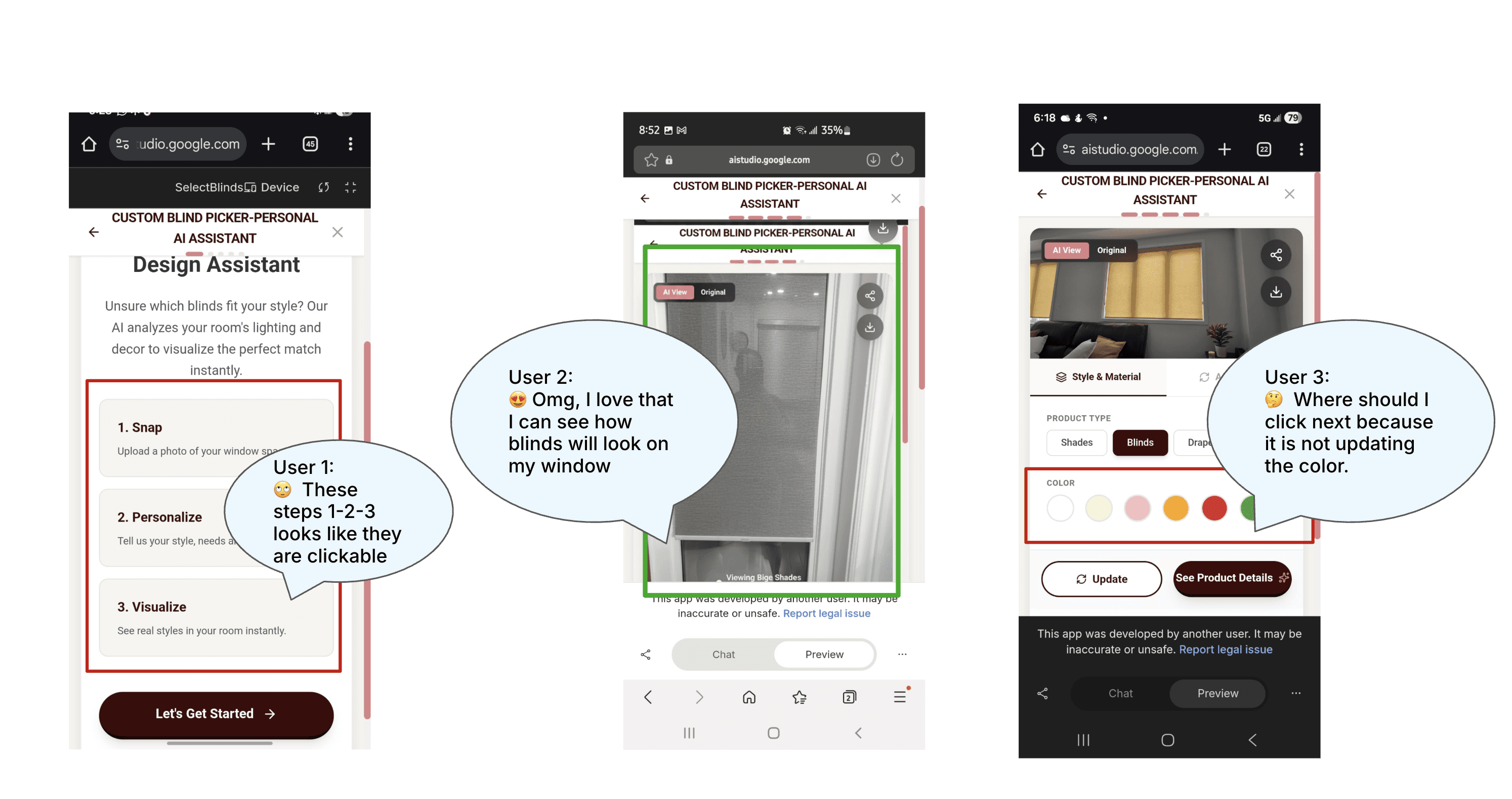
Learning from user testing
✅ What worked:
Visual hierarchy guided them naturally.
Users were able to understand the primary action within 5-6 seconds.
AI render of Blinds/shades was really fascinating for the users to see on their own window, which created the Aha moment. (Moment of Delight)
❌ What did not work:
The user felt that Step 1-2-3 all were clickable which wasn’t. (Moment of Confusion)
The user was confused when the preview did not updated based on different color selection and user did not notice the “update” button was there at the bottom. (Moment of confusion)
The measurement functionality wasn’t working on the last step.
“Inside Mount” and “Outside Mount” was confusing language unless the user actually tried and saw both types of mounts on window.
Reflection & feedback quotes
📣 Quotes:
“What does “Inside mount” and “Outside Mount” mean?” 🤔
“Do I have to upload the picture right now?” 😕
“ I love that I can see how blinds will look on my window”. 😍
Ethical considerations ensuring fairness
Consent needed before asking to upload picture of room:
There should be clear language to explain users that we will use picture just to generate ideas and to show the blinds on your own window/room.Traceability:
“Why was this product recommended?” We need to find from what data AI is pulling the recommendation
to the users. In this case the AI will go to structured Product Database and performs Matching Logic.Consistent:
Give equally detailed explanations for all choices. There should be clear explanation, social proof like review from actual users which builds trust and user can feel confident to make purchase.Adjustable/Flexible:
Allow users to adjust inputs anytime. The user should be able to make changes if they change mind.Budget confusion:
“Based on your need for sunlight control and a $650–$850 budget, here are options with high energy efficiency and privacy.” Adding this kind of explanation makes the AI feel rational, transparent, and human-centered rather than a black box.
Perspective on AI Design
AI Design Lessons: The product should remain accurate, ethical and trustworthy.
User should be guided each and every step, by the UI clues like tooltips, option to leave any time.
AI should always be transparent and guide user giving the explanation why AI recommended a particular product and reasons behind it.
Always keeping “Human in the Loop” which ensures the system remains Accurate, Ethical, Trustworthy, Bias Mitigation and Catch any Blind Spots that AI algorithms may overlook.